 Smart Printer
Unified print sources
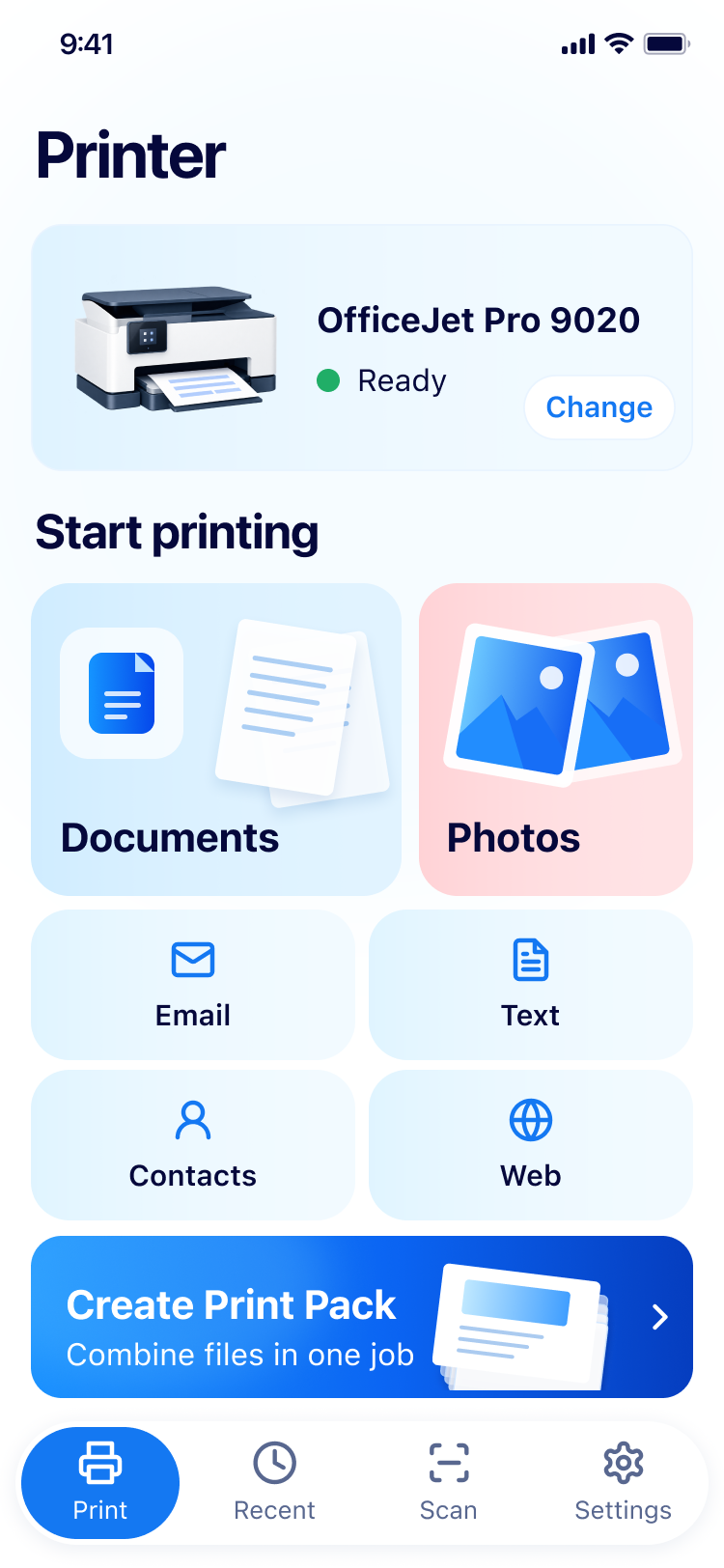
The home surfaces documents, photos, email, text, contacts and web pages as six print sources, alongside an independent print pack entry. Shorter, more consistent path from selection to print.
6 sources + print packSmart Printer unifies documents, photos, email, text, contacts and web pages as print sources, with smart print check and print pack for a more reliable print.
From a single file to a multi-file print pack, from photos to contacts, all routes converge into one flow.
The home surfaces documents, photos, email, text, contacts and web pages as six print sources, alongside an independent print pack entry. Shorter, more consistent path from selection to print.
6 sources + print packAutomatically detects 9 issue types before system print — blank pages, cropping, orientation, page range and more — graded by fix-required / suggested / passed.
9 check itemsOrganize multiple sources into one continuous task with per-item page ranges, whole-pack check and print summary. Drafts are saved automatically.
Multi-file printingPhotos: single full-page, 2-per-page, 4-per-page, contact sheet. Contacts: simple card, detailed, address book list, address label.
Photos · ContactsCamera or photo library import with auto / manual capture, crop, filters and rotation; share, save or go straight to print preview.
On-deviceRecent files are listed by time with category filter and swipe-to-delete. Print pack drafts can be restored after exit or crash to avoid rework.
RestorableAutomatically discovers compatible printers on the same Wi-Fi network with one-tap switching; if the connection drops, the app tries to recover automatically so queued jobs stay intact.
Auto-discovery · reconnectLive queued, printing, succeeded and failed status with one-tap retry for failed jobs; print history stays on-device so every result can be reviewed later.
Trackable · retryFrom selecting content to the iOS system print page, the flow preserves task state and is cancellable.
Pick printable content from six sources or print pack
Inspect page numbers; apply a preset if needed
Auto-detect 9 issue types with one-tap fix or ignore
iOS system print page handles final options & submit
Files, scans and print pack drafts are processed locally; no upload unless cloud features are enabled.
Print files, scan images and print pack drafts are stored on the device by default; not uploaded to the cloud.
Telemetry records only structured events (duration, result counts, error codes), never file bodies, image content, contact fields or web content.
Privacy policy & terms are loaded over HTTPS from a trusted domain; failed loads provide a retry and untrusted redirects are blocked.
From connecting a printer to content safety, explained in one place.
Any AirPrint-enabled printer works. Make sure the printer and your phone are on the same Wi-Fi network — the app automatically discovers compatible devices on the local network, with no manual address entry.
All six source types can be printed directly: documents, photos, email, text, contacts and web pages. You can also combine them in order into a print pack for one continuous output.
Yes. Smart print check automatically detects 9 types of issues — blank pages, cropping, orientation, page ranges and more — before entering system print, grouped into "must fix / suggested / passed" with one-tap fix or ignore.
No. Print files, scan results and print pack drafts are processed and stored on-device by default; without cloud features enabled, content never leaves your device.
Yes. Photos offer full-page single, 2-up, 4-up and thumbnail contact-sheet layouts; contacts offer simple cards, detail view, address-book list and address labels.
From home to the iOS system print page, the flow preserves task state, is cancellable and restorable.